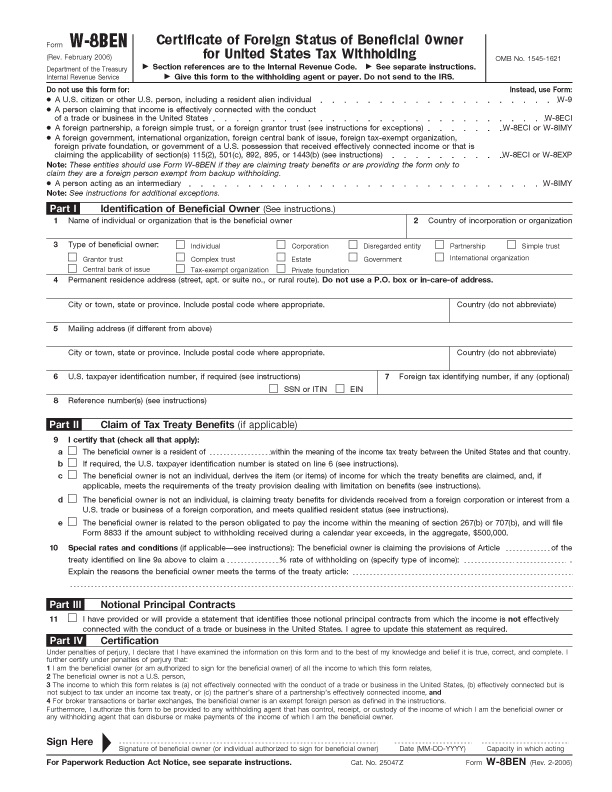
Fill in the following fields:
1. Name of Individual or prganization that is the beneficial owner — Your full name. NOME COMPLETO
2. Country of incorporation or organization — Your Country. PAÍS RESIDENTE
3. Type of beneficial owner — tick “Individual”. Assinalar INDIVIDUAL
4. Permanent residence address… — Your mailing address, with city/town, state, postal code, and country. MORADA
Part II: Claim of Tax Treaty Benefits
On line no.9 “I certify that (check all that apply):”, tick “a The beneficial owner is a resident of …” and fill in your country in the blank field.
Assinalar o 9 a), e completar com o PAÍS RESIDENTE
Part III: Notional Principal Contracts
Tick line no.11, “I have provided or will provide a statement that ….”.
Part IV: Certification
Sign your signature at “Sign Here” and fill in the Date. Note that it is in the MMM-DD-YY format, month comes first before date. Example: 06-29-06.
Part III: Notional Principal Contracts
Tick line no.11, “I have provided or will provide a statement that ….”.
Part IV: Certification
Sign your signature at “Sign Here” and fill in the Date. Note that it is in the MMM-DD-YY format, month comes first before date. Example: 06-29-06.
ASSINAR NO FIM, e completar com a data MÊS-DIA-ANO
Como Preencher W-8 Ben, como preencher w8 ben, como preencher w8-ben
Como Preencher W-8 form, como preencher w8 form, como preencher w8-form
Como Preencher W-8 forme, como preencher w8 forme, como preencher w8-forme
Como Preencher W-8 forms, como preencher w8 forms, como preencher w8-forms
w 8 intructions, w-8 ben intructions, w8-ben intrictions, w-8 ben intructions,
w 8 form 2009